 Contact
 Support
 Wishlist
 Home
Home Categories
 PHP Script
 WP Themes
 WP Plugins
 66Biolinks Plugins
 Tutorial
 Important Links
 Hosting
 Services
 Request Item
 My account
Productivity
Image Compression Tool vs Desktop Software: Real Comparison
Jan
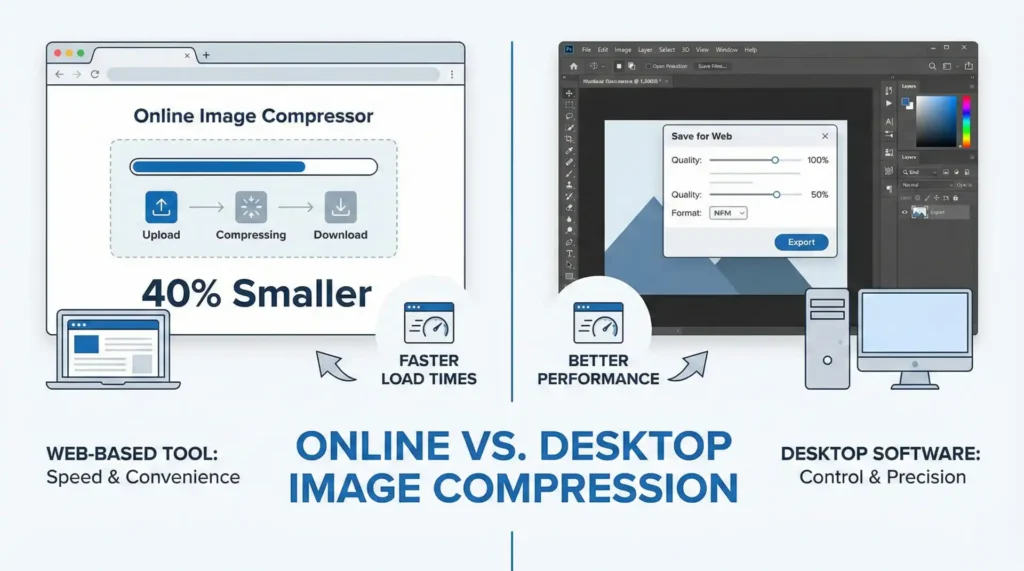
Large images slow down websites, increase hosting costs, and hurt search rankings. That is why image compression is no longer optional. But when it comes to optimizing images, many people are confused between two choices: online image compression tools and desktop software like Photoshop, ImageOptim, or GIMP. Both promise smaller files and better quality, but they work very differently. In this real-world comparison, you will learn which option saves more time, money, and effort—especially if you run a website, blog, or online business.
Why Image Compression Is Critical Today
Modern websites are image-heavy. Product photos, blog banners, social media graphics, and thumbnails all add up quickly.
Google confirms that page speed affects rankings and user experience. You can test your site’s image impact using Google PageSpeed Insights:
https://pagespeed.web.dev/
Compressed images:
- Load faster
- Use less bandwidth
- Improve mobile performance
- Reduce bounce rates
Now let’s compare the two main ways to achieve that.
What Is an Online Image Compression Tool?
An online image compression tool runs directly in your browser. You upload an image, it compresses it on a server, and you download the optimized file.
Platforms like the Toolszu Image Compressor offer fast, one-click compression without installing any software.
Key features
- Works on any device
- No installation
- Supports bulk uploads
- Often includes WebP and modern formats
What Is Desktop Image Compression Software?
Desktop software includes tools like:
- Adobe Photoshop
- ImageOptim
- GIMP
- RIOT
- Affinity Photo
You install them on your computer and compress images locally.
Image Compression Tool vs Desktop Software
Let’s compare them in real-world usage.
1. Ease of Use
Online tools:
Open a website, upload images, download compressed files. That’s it. No setup.
Desktop software:
You must install the program, learn the interface, and manually export optimized images.
For non-designers and website owners, online tools are much easier.
2. Speed and Workflow
Online tools:
Bulk upload 20–100 images and get them compressed in seconds. Tools like the Toolszu Bulk Image Optimizer automate the whole process.
Desktop software:
You must open, export, and save images one by one or through scripts. This takes more time.
For content creators and bloggers, browser tools save hours.
3. Compression Quality
Both methods can produce excellent results.
Desktop software gives you more control over:
- Bit depth
- Color profiles
- Advanced formats
Online tools use smart algorithms that balance quality and file size automatically. For web images, the difference is usually invisible.
You can verify file size and format using Toolszu’s Image Size Checker.
4. Cost
Online tools:
Many are free or have generous limits. You don’t pay for licenses.
Desktop software:
Photoshop and Affinity cost money. Even free tools need system resources.
For small websites, free online tools are more cost-effective.
5. Accessibility
Online tools:
Work on Windows, macOS, Linux, tablets, and even phones.
Desktop software:
Locked to one device. If you switch computers, you must reinstall.
This makes browser-based tools ideal for remote teams and freelancers.
6. Storage and Performance
Online tools:
No storage required on your PC. Everything runs in the cloud.
Desktop software:
Large programs use disk space and RAM. Older systems may slow down.
When Desktop Software Is Better
Desktop software makes sense if:
- You do heavy photo editing
- You work with RAW files
- You need color grading and retouching
If you are a photographer or designer, you still need desktop tools.
When Online Tools Are Better
Online image compression tools are better if you:
- Run a website or blog
- Manage product images
- Upload social media graphics
- Want fast results without design skills
For most website owners, this is the smarter option.
SEO Impact: Tool vs Software
Search engines only care about:
- File size
- Format
- Loading speed
They do not care how the image was compressed.
Whether you use Photoshop or an online compressor, the final result must be:
- Small
- Clear
- In WebP or optimized JPG/PNG
You can test performance with Toolszu’s Web Performance Analyzer.
Common Mistakes People Make
- Uploading original camera images directly
- Forgetting to convert to WebP
- Over-compressing and destroying quality
- Using Photoshop for simple web tasks
The goal is not perfection—it is speed and clarity.
FAQ – Image Compression Tools vs Desktop Software
Which one is better for websites?
Online image compression tools are better because they are faster and simpler.
Is desktop software more accurate?
Yes, but most websites do not need that level of control.
Do online tools reduce image quality?
No. Modern compressors keep visual quality while reducing file size.
Can I use both?
Yes. Edit in desktop software, then compress online for web use.
Is WebP supported by online tools?
Yes, most modern tools, including Toolszu, support WebP.
Final Thoughts
Desktop software is powerful, but for most web users it is too complex and time-consuming. Online image compression tools give you the speed, quality, and convenience needed to keep your site fast and SEO-friendly.
If you want an easy way to optimize images without installing anything, try a browser-based image compressor from Toolszu and see the difference on your site.
